CellarPro Level 1 Parameters
In order for us provide the best assistance, please contact CellarPro support to provide the following requested information.
- Start by turning the unit off.
- If you are using a remote thermostat/bottle probe, please unplug it.
After 10 minutes:
- Turn on the unit,
- Change all fan speeds to "high", and
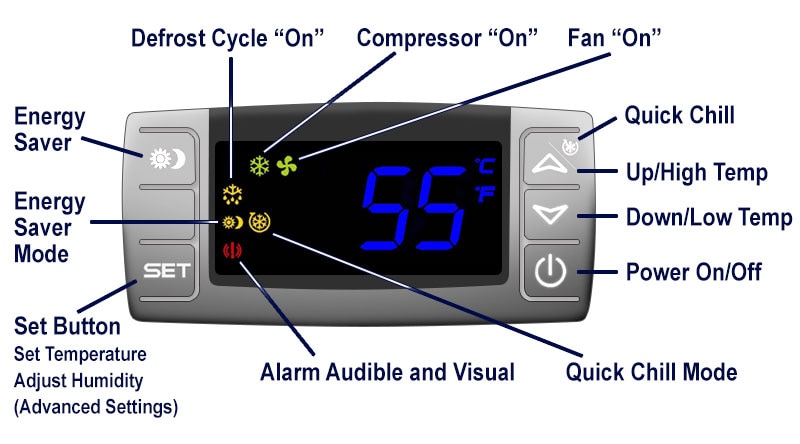
- Wait until the snowflake and fan icons are lit on the digital display
Then do the following:
- Check if the cold-side fan (inside the cellar) and the hot-side fan (outside the cellar) are blowing air with roughly the same velocity
- Press and hold the "Set" and the "Down" buttons for 3 seconds, until "HY" appears on the display, then let go.
- Press "Set" and record the number for "HY" (Differential):___
- Press "Set" and record the number for "FON" (Fan On):___
- Press "Set" and record the number for "ALU" (High Temp):___
- Press "Set" and record the number for "ALL" (Low Temp):___
- Press "Set" and record the number for "HES" (Economy Differential):___
- Press "Set" and record the number for "DP3" (Condenser Probe):___
- When the cooling unit reaches its setpoint, the snowflake icon will turn off but the fan icon will remain lit. At this time, please confirm again that the cold-side fan (inside the cellar) and the hot-side fan (outside the cellar) are blowing air with roughly the same velocity
In addition, please send 4 pictures of the cooling unit, 2 from the front (at a distance of 1 foot and a distance of 7 feet) and 2 from the rear (at a distance of 1 foot and a distance of 7 feet).
Finally, please confirm the following information
- Size of cellar (W x D x H)
- Total square feet of uninsulated walls in the cellar, if any (eg uninsulated concrete, sheetrock, brick)
- Total square feet of glass in the cellar, if any
- Type of glass, if any (eg single pane vs double pane)
- Number of wall(s) or ceiling with exterior exposure, if any
Once we receive the information requested above, we'll review and reply with further instructions.

We've put together some basic resources to guide you through the process of choosing a cooling unit and building a cellar.


To contact our support team, email us or call 877.726.8496.